A network diagram represents the logical sequence of project activities.
It forms the backbone of modern scheduling tools like Primavera, MS Project, and Orangescrum Work Planner.
1. Types of Network Diagrams
- Activity-on-Arrow (AOA) – Older format; uses arrows to represent activities.
- Activity-on-Node (AON) – Commonly used today; activities represented by boxes (nodes) linked by arrows.
Example (AON Format):
Start → Foundation → Columns → Slabs → Finishes → Handover
2. Activity Coding
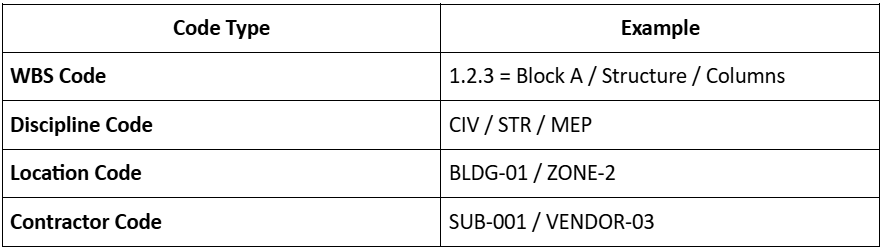
Activity coding helps organize, filter, and analyze schedule data efficiently.
Coding Categories:
Best Practices:
- Maintain consistent naming conventions.
- Align activity codes with WBS and cost codes.
- Use logical dependencies (Finish–Start, Start–Start, etc.).
- Include milestones for tracking approvals, procurement, and inspections.
“A well-coded network turns thousands of activities into a manageable model.”